Welcome to curated list of handpicked free online resources related to IT, cloud, Big Data, programming languages, Devops. Fresh news and community maintained list of links updated daily. Like what you see? [ Join our newsletter ]

OpenAPI-backed API testing in PHP projects: Laravel example

Categories

Tags agile tdd web-development php

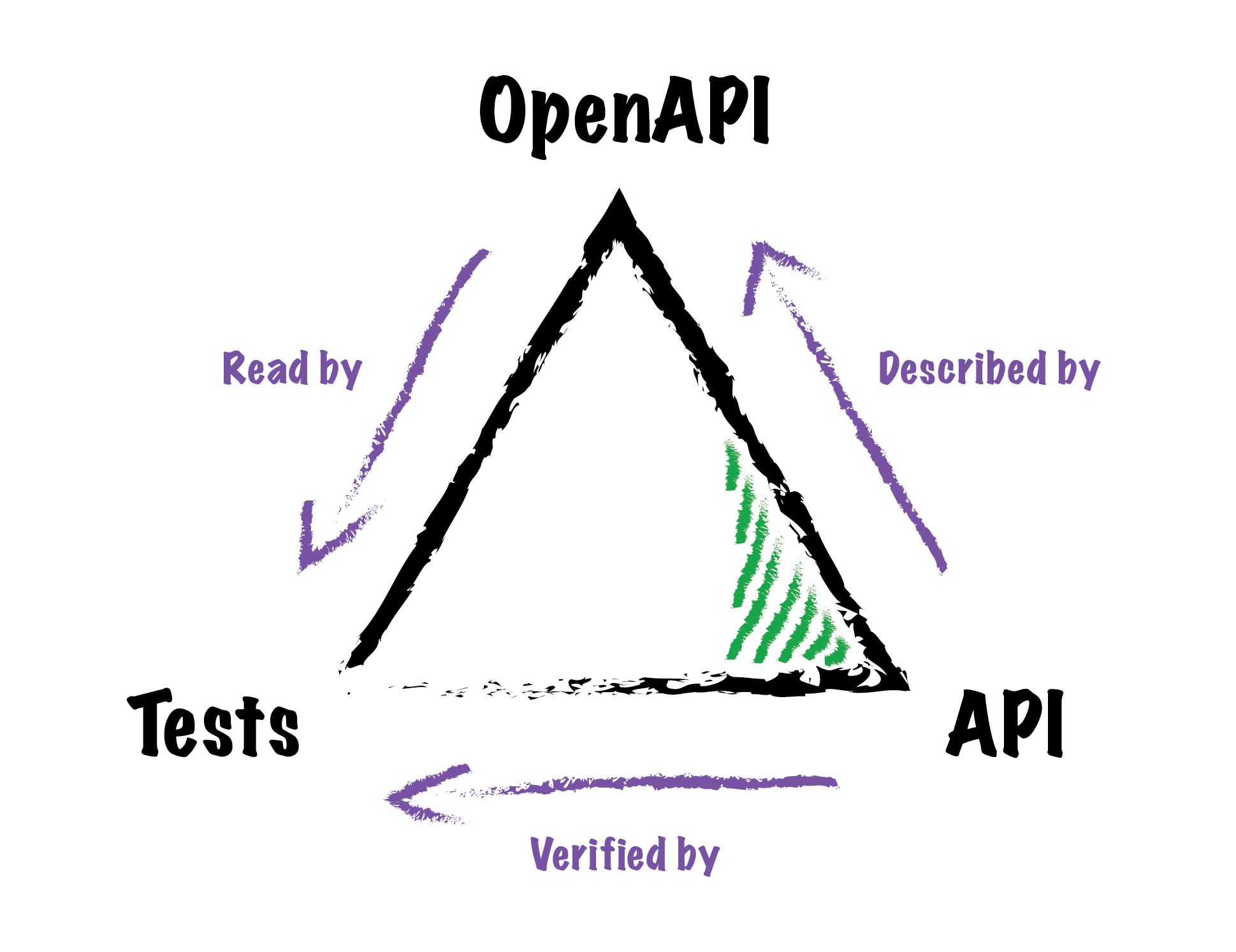
OpenAPI is a specification intended to describe RESTful APIs in JSON and YAML, with the aim of being understandable by humans and machines alike. By Yannick Chenot.

In this article, we will see how to combine OpenAPI 3.0.x definitions with integration tests to validate whether an API behaves the way it’s supposed to, using the OpenAPI HttpFoundation Testing package.

The article has these sections:

  • The issue
  • A solution
  • PSR-7
  • A Laravel example

OpenAPI definition as a reference for code and tests

Source: https://tech.osteel.me/posts/openapi-backed-api-testing-in-php-projects-a-laravel-example

The OpenAPI specification has become a popular choice to describe APIs over time, but whether we use it or not doesn’t change the fact that the corresponding definitions need to be maintained; in other words, using OpenAPI does not automagically make the aforementioned issues go away. Good read!

[Read More]

Sprint planning checklist

Categories

Tags agile teams cio software management

A Sprint Planning checklist? How dare you: Agile is a mindset, not a methodology. It is a journey, not a destination. There is no one-size-fits-all approach, and what else could you possibly cover with a checklist, the mother of all standardized processes? By Stefan Wolpers.

Some of you may be aware that checklists originate from an aviation accident. A new plane with a crew of most experienced test-pilots crashed during take-off. It turned out that the plane had no mechanical problems at all, the flight crew just forgot a simple step during the take-off procedure.

This Sprint Planning checklist is modeled after a former Scrum Team of a large multi-national, traditional utility company at the beginning of its Scrum journey. In other words, you will not be able to apply this checklist to your Scrum Team without inspection and adaptation.

The article then deals with:

  • Preparing the Sprint Planning
    • Address the number of open tickets
    • Ask the team members to update the Sprint boards
    • Run the Sprint Review
    • Run the Sprint Retrospective
    • Remind all team members of tomorrow’s Sprint Planning
  • Planning
    • Cleaning up the old board(s) with the whole Scrum Team by walking the board and checking each ticket’s status
    • Discuss the possible spill-over
    • Close the previous Sprint
    • Ask the Product Owner to share the business objective
  • After the Sprint Planning
    • Sync the offline board with the online board
    • Start collecting data for the upcoming Sprint Retrospective
    • Participate in the outstanding Sprint survey

Scrum event checklists can serve both the junior practitioner—what do I have to do—and the experienced agile practitioner to deal with the complexity at hand. Checklists like this example of a Sprint Planning checklist are by no means a violation of the agile mindset but lessen the cognitive load of running events and practices, thus avoiding unnecessary issues with the rest of the organization. Good read!

[Read More]

How to supercharge string search through a directory hierarchy on a Linux/Unix

Categories

Tags linux devops software cloud performance

Usually, I use the grep command/egrep command for code searching on my box. Recently, I come across another cool tool called ag. It is an attempt to make something better than ack, which itself is better than grep command. Let us see how to install and use the ag tool on Unix-like operating systems. By Vivek Gite.

The ag command can recursively search for PATTERN in PATH. Like grep or ack, but faster. Ag uses Pthreads to take advantage of multiple CPU cores and search files in parallel. Files are mmap()ed instead of read into a buffer. Literal string searching uses Boyer-Moore strstr.

# Search for 'curl' in files with suffix .sh, .bash, .csh, .tcsh, .ksh, .zsh and .fish shell scripts only.
ag --shell 'curl' ~/bin/

# ag can search any number of files simultaneously.
ag UNIX foo bar foobar

# ag can only report the number of times that the pattern has been matched for each file. Just pass the -c option:
ag -i -c unix foo bar foobar

# One can search contents of compressed files too. Just pass the -z option:
ag -z 'main()' file.zip xkcd.tar.gz

# No need to use the egrep command with 'regex':
ag '[Cu]url' ~/bin/

The article provide the answer to the question why use ag tool:

  • It is faster than both grep and ack
  • It ignores file patterns found in your ~/.gitignore and ~/.hgignore
  • You can add custom ignore patterns to a ~/.ignore file
  • Ag uses Pthreads to take advantage of multiple CPU cores and search files in parallel

It also provide example how to search for various patterns and installation instruction for various Linux flavours and Mac. Good read!

[Read More]

10 docker security best practices

Categories

Tags docker devops infosec containers software-architecture cio

Docker containers and Kubernetes are the driving force of a modern software development life cycle. Although Docker is a safer option than working on the host machine directly, many potential security issues may arise while working with containers. By Sofija Simic, an aspiring technical writer at phoenixNAP.

This is a short and to the point guide, and it mentions:

  • Update Docker and host regularly
  • Configure resource quotas
  • Use non-root users
  • Limit capabilities
  • Prohibit new privileges
  • Use trusted images

.. and few more. When pulling an image from online registries, make sure it is from a secure, trusted source. The safest option is sticking to the official Docker hub. Avoid public third-party registries which lack control policies. Also, use image scanning tools to search for vulnerabilities before downloading anything on the host system.

You should scan images regularly, not just when downloading them from an online registry. Even local images that haven’t been utilized for a while should be scanned before building a container. To get more details follow the link to the article. Sweet!

[Read More]

How to grid search deep learning models for time series forecasting

Categories

Tags how-to machine-learning big-data data-science

Grid searching is generally not an operation that we can perform with deep learning methods. This is because deep learning methods often require large amounts of data and large models, together resulting in models that take hours, days, or weeks to train. By Jason Brownlee.

This tutorial will guide you through:

  • How to develop a generic grid searching framework for tuning model hyperparameters
  • How to grid search hyperparameters for a Multilayer Perceptron model on the airline passengers univariate time series forecasting problem
  • How to adapt the framework to grid search hyperparameters for convolutional and long short-term memory neural networks
  • Train-test split
  • Series as supervised learning
  • Walk-Forward validation
  • Repeat evaluation
  • Summarize performance
  • Worked example

Among other things you will develop a grid search test harness that can be used to evaluate a range of hyperparameters for different neural network models, such as MLPs, CNNs, and LSTMs. There is plenty of links attached for you to learn even more. Excellent!

[Read More]

Learn how to use webhooks by connecting NodeJS, IFTTT and Twitter

Categories

Tags how-to event-driven messaging nodejs app-development web-development

In this guide, you’ll learn what webhooks are and how they work. You’ll then put together a simple Webhook integration for IFTTT and Twitter, using Node and a simple Express app. By Robbie Cahill.

Webhooks are like APIs in reverse. With an API, you make requests to an API provider. Webhooks reverse this flow. You need a public URL for your application to test webhook integrations end to end. There are a few tools out there that can give you one but author suggests expose because the syntax is easier to work with than other tools where you need to specify a protocol and port.

The article main content:

  • What are webhooks?
  • Get the code and run the app
  • Configuring IFTTT

The IFTTT Twitter integration supports sending notifications for things like retweets of your tweets and other useful stuff. There are also thousands of IFTTT triggers you can plug into. Nice one!

[Read More]

Remote work is changing how productivity is measured

Categories

Tags cio miscellaneous agile teams career

Companies are getting a reality check about how work gets done. In March 2020, the largest “work-from-home” experiment in history began. By Matt Klassen.

The moment entire companies moved their workforces remote, business owners and employees alike both started to realize new realities about their jobs. For years, people had been told, “It’s essential for you to be in the office,” only to suddenly realize that being in the office wasn’t so essential after all.

Companies all over the world have realized that working from home is not only more efficient but more suitable for the wants and needs of today’s workers.

The main points mentioned in the article:

  • Businesses will embrace flexibility
  • Automation will increasingly be essential

Many businesses didn’t realize how inefficient they were being until the pandemic hit. The unfortunate consequence, of course, is that a lot of people have lost, and may continue to lose, their jobs due to the economic impact of the pandemic. With fewer people, manual tasks must be replaced by automation. Good read!

[Read More]

How to set up your own home VPN server

Categories

Tags how-to infosec miscellaneous servers

Virtual Private Networks (VPNs) are very useful, whether you’re traveling the world or just using public Wi-Fi at a coffee shop in your hometown. But you don’t necessarily have to pay for a VPN service—you could host your own VPN server at home. By Chris Hoffman.

Your home Internet connection’s upload speed will really matter here. If you don’t have much upload bandwidth, you may just want to use a paid VPN service. Internet service providers usually offer much less upload bandwidth than they do download bandwidth. Still, if you do have the bandwidth, setting up a VPN server at home might be just the right thing for you.

The article goes over:

  • Why you might want to do this
  • Why you might not want to do this
  • Option one: Get a router with VPN capabilities
  • Option two: Get a router that supports DD-WRT or other third-party firmware
  • Option three: Make your own dedicated VPN server
  • Bonus: Host your own VPN server elsewhere

Be sure to configure your VPN server securely. You’ll want strong security so no one else can connect to your VPN. Even a strong password might not be ideal — an OpenVPN server with a key file you need to connect would be strong authentication, for example. You will also get plenty of resources to further enhance your knowledge. Great one!

[Read More]

Why Gatsby chose headless WordPress for our blog

Categories

Tags web-development php javascript frameworks

Back when Gatsby first launched we produced all of our content — including blog, landing pages, and documentation — in a public GitHub repo. That approach just made sense for an open-source software company where most of the team were web developers. And it worked fine … for a while. By Hashim Warren.

As the team grew and added staff from different disciplines (marketing, events, HR, etc), however, this workflow became less ideal. Not everyone was equally comfortable with the command line or writing their content in MDX markdown files.

We had a lively debate within Gatsby about which CMS to adopt. Because of our ecosystem of 2,600+ Gatsby plugins, we were spoiled with the riches of choice. We could use an open-source CMS like Ghost, Drupal, or Strapi. Or we could stick with MDX files and use Forestry or Netlify CMS.

The article then describes:

  • Why headless WordPress?
  • Unlocking a faster workflow
  • Page builder bonus
  • Inviting the community

Beyond the blog, they are also working on using WordPress to collect and manage community submissions to our site showcase. Once that is ready to ship, you will be able to submit your Gatsby site through a form. Then, through the power of GraphQL mutations, and WPGraphQL, the submission will be automatically captured in WordPress, then edited and published. Good read!

[Read More]

RPC over RabbitMQ (with Elixir)

Categories

Tags erlang programming web-development app-development performance

At Community we use RabbitMQ, a lot. It’s the infrastructure backbone that allows our services (over forty at this point) to communicate with each other. That mostly happens through events (since we have an event-sourced system), but in some cases what we need is a request-response interaction between two services. By Andrea Leopardi.

We settled on using it for request-response interactions as well in the form of Remote Procedure Calls (RPCs). In this post, I’ll go over the architecture of such interactions, the RabbitMQ topologies we use to make them work, the benefits around reliability and the compromises around performance, and finally how this all implemented to be as fault-tolerant as possible with Elixir.

The article deals with:

  • What is an RPC
  • Why RPCs over RabbitMQ
  • RabbitMQ topology
  • Caller architecture
    • The response queue
    • Elixir process architecture
  • Receiver architecture and topology
    • In Elixir, as always, the answer is Broadway

We saw how we architected a system to make service-to-service RPCs over RabbitMQ. We went over the RabbitMQ topology we use, showing all the queues, exchanges, and bindings involved. We also covered the Elixir-specific implementation of this system, to sprinkle some practical examples on top of this stuff. You will find also plenty of links to further reading in the article. Good read!

[Read More]